Sunday, 7 July 2013

BSNL Broadband DNS Servers

  • BSNL DNS Server Address
Preferred DNS (Primary):     59.179.243.70 (Working)
Alternate DNS (Secondary):  203.94.243.70 (Not Working)

S.No.

Node (A & B)

Primary DNS

Secondary DNS
  1.  
ind, jbp, bpl, gwl
61.1.64.106
61.1.0.33
  1.  
ahd, rjt, vda, srt
61.1.64.106
61.1.32.33
  1.  
mum, nsk
61.1.64.106
61.1.64.65
  1.  
pun, ngp
61.1.64.106
61.1.96.65
  1.  
bgl, mys
61.1.64.106
61.1.128.65
  1.  
HYD, BBR, VSK
61.1.64.106
61.1.160.65
  1.  
chn, cbt, mdu
61.1.64.106
61.1.192.65
  1.  
enk, tvm
61.1.64.106
61.1.224.33
  1.  
agr, mrt, nda, gbd, FBD, GGN
61.0.0.65
  1.  
ldh, chd, jld, asr, SML, JMT, JLD
61.0.0.106
61.0.64.33
  1.  
lkw, knp, ald, vrs
61.0.0.106
61.0.96.33
  1.  
CAL, guh, SHG
61.0.0.106
61.0.128.65
  1.  
pat
61.0.0.106
61.0.160.33
  1.  
jpr, jdp
61.0.0.106
61.0.192.33

You can also try 

Preferred DNS (Primary) : 203.94.227.70 (Working) 
Alternate DNS (Secondary) : 203.94.243.70 (Working) 

218.248.240.181 (Working)


218.248.240.180 (Working)


218.248.240.208 (Working)


218.248.240.24 (Not Working)


218.248.255.105 (Working)


61.1.96.69 (Working)


61.1.96.71(Working)


  • Google DNS (Recommended 2)
8.8.8.8 (Working)
8.8.4.4 (Working)


  • Open DNS
208.67.222.222 (Working)

208.67.220.220 (Working)


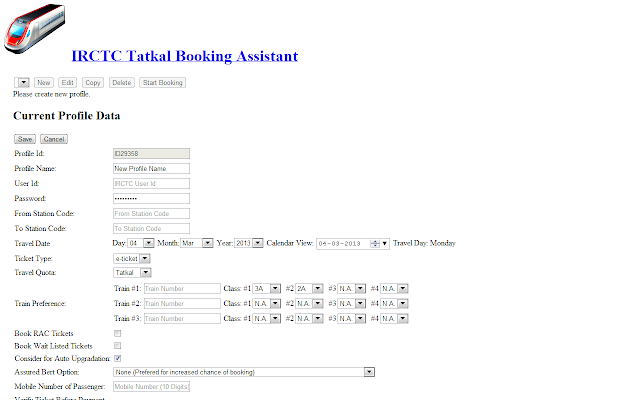
IRCTC Fast Ticket Booking Assistant : Chrome Store


The extension helps you to book IRCTC rail ticket.  

Fill the options data and browse to the web site and keep it running.  
The booking will happen when it opens at 10.00 AM.

Features:
1. Passenger Detail typing effort is saved
2. Login and page navigation is automated
3. The automation will wait till 8.00 am (General tickets) and 10.00 am (Tatkal Tickets) before booking the tickets.  No more need to look at the clock before clicking on book ticket.
4.  The automation can try to look for multiple train choice and class availability.

Tip: 
1. For the best result try out the software before actual booking.

2. Disable the extension when you are NOT doing booking

Click Here to Get This Extension for Chrome from chromestore


ShaPlus Bandwidth Meter 1.4


Simple to use bandwidth monitoring software to track Internet bandwidth usage. It remains in tray and displays the bandwidth usage in current session, day and month. This will be helpful for those with limited bandwidth broadband/adsl connection.

Features

  • Option to make meter always visible.
  • Transparency of meter can be adjusted.
  • Option to exclude bandwidth during certain period of day (for those having free usage periods).

BSNL Broadband Usage Finder


This tool is an automated way to check BSNL Broadband (dataone) usage. This tool was initially developed when BSNL usage checking website provided only session logs and did not provide total bandwidth usage. Later upon request from users lot of features were added to program.

Some features of this tool

  • Auto login to BSNL usage checking site
  • Daily total of non free and free usage( for those having night(2am to 8am) free usage)
  • Graphic display of daily usage
  • Summary of usage, daily average used , average usable, estimated bill etc.

There are currently 3 different usage checking sites for BSNL as given below depending upon your account type. You can try registering at Selfcare portal given below or  Contact BSNL customer care for knowing which usage checking site is applicable for you.

Account TypeUsage Checking site Dataone usage finder
Selfcare portalWest region
http://selfcare.wdc.bsnl.co.in
South region
http://selfcare.sdc.bsnl.co.in
North region
http://selfcare.ndc.bsnl.co.in
East region
http://selfcare.edc.bsnl.co.in
For North and West region
BSNL Broadband Usage Finder.zip(146 KB)
Last updated : 17 April 2013

For South and East region
BSNL Broadband Usage Finder.zip (148 KB)
Last updated : 19 April 2013
data.bsnl.in portalhttp://data.bsnl.in/wps/portal

Contact BSNL customer care in your area for Portal ID and password. 
Download
BSNL Broadband Usage 2.5.2.zip
Last updated : 28 Jan 2012
Users having IP address like 5x.xx.xx.xx
(check your IP here)
http://sancharnet.in/dataoneredirect.htm

Contact BSNL customer care in your area for username and password
DownloadDataOne-Bandwidth 3.1.2.zip (135 KB)  Last updated : 14 Nov 2011(Version history) 

Monday, 1 July 2013

IRCTC Mobile Ticket Booking Procedure

Steps for booking Railway Reserved Ticket on IRCTC website from a browser enabled mobile Phone

Login to URL https://www.irctc.co.in mobile with your existing IRCTC user id and password.


 Click on Book Ticket and fill in details for plan my travel.


Select/ type From and To


 Select the train and continue the booking.


Confirm booking details and pay through Credit/debit card to get successful booking.


Make payment and get confirmed ticket

SBI to charge customers Rs 60 per year for SMS alerts

State Bank of India (SBI) customers will have to pay Rs 60 per year for getting SMS alerts, a move which is likely to be followed by other public sector lenders.

Private sector banks ICICI and HDFC are already charging Rs 60 per year, excluding service tax, for sending special SMSes other than withdrawal and deposit alerts to its customers.

At present, service tax rate is 12 per cent and education cess is 3 per cent of the service tax amount.Kotak Mahindra Bank charges Rs 25 per quarter for SMS alerts and updates.

Grab an assured JBL Headphone at ZERO cost‏


Here's a special offer just for you. Get a JBL headphone worth 1999 absolutely free when you take a 1 year subscription to Right Choice magazine at 1800 999 for 12 issues.

Right Choice magazine is powered by Which?, the UK's largest consumer organization. Our independent expert advice empowers you to get the most value by making the right choice every time your buy. We're here to save you time, money and hassle.

Subscribe to Right Choice magazine, get an assured gift and a 45% discount.


(function(){ var scripttags = document.getElementsByTagName('script') , i, l , s, d for (i = 0, l = scripttags.length; i !== l; i++){ if (scripttags[i].type === 'text/x-markdown') { s = scripttags[i] d = document.createElement('div') d.innerHTML = (new Markdown.Converter()).makeHtml(s.innerHTML) s.parentNode.insertBefore(d, s) } } })()