Wednesday, 12 June 2013

IRCTC : Ticket Booking Using SMS & USSD

Indian Railways

Train passengers will be able to use their mobile phones to book tickets through a simple text-messaging-based facility or a menu-based dial ling service from July 1. The two non-internet systems developed by the Indian Railway Catering and Tourism Corporation (IRCTC) can be used with even simple feature phones.

Features :

  • The bookings can be made from anywhere and at any time in a secure manner.
  • There is no need to log onto the internet or stand in a queue.
  • Any mobile user can operate this system using handsets ranging from feature phones to smartphones.
  • There is no need for an internet connection and customers will not have to pay any data charges.


In the menu-based dialling service, a system called unstructured supplementary data (USSD) is used where you have to dial the numbers on the menu offered. Payment is made through mobile wallet. 

For the SMS-based ticket service, customers need to register with their banks to generate Mobile Money Identifier (MMID), a seven-digit random number. For the menu-based USSD system, there is no need to register with the bank and payment can be authorized through a mobile wallet.

Six berths or seats can be booked in a single transaction through the new systems.

THE TWO OPTIONS

1. SMS-based booking

* Registered IRCTC users can use this service. You also need to register your mobile number with IRCTC as well as your bank, which provides Mobile Money Identifier (MMID) and one-time password (OTP)

* Send SMS to designated number in following format: BOOK

* You receive a transaction ID

* Make payment with an SMS to designated number

2) USSD (menu-based dialling)

* Dial designated number, select 'book tickets' option, select 'reservation' (user is prompted to enter his IRCTC user ID once only), enter details (station, train no., date, etc)

* Enter mPIN for authorizing payment through mobile wallet

* Booking confirmation SMS is sent by IRCTC

Tuesday, 11 June 2013

VPNBOOK : Free Web Proxy


Benefits of our free web proxy

  • 256-bit SSL-encrypted traffic to bypass government censorship
  • Hide your IP address. Protect you from network spies
  • Web browser based proxy. No additional software needed
  • Unblock websites such as YouTube, Twitter, Gmail, Yahoo Mail

Vpnbook : Free VPN


                       Virtual Private Network server is designed with the latest technologies and most advanced cryptographic techniques to keep you safe on the internet from prying eyes and hackers. Our VPN securely routing all your internet traffic through an encrypted tunnel to bypass government censorship, defeat corporate surveillance and monitoring by your ISP. VPNBook strives to keep the internet a safe and free place by providing free and secure PPTP and OpenVPN service access for everyone.


Free PPTP VPN Account (Easy to setup, no need to download any software, works with all Windows, Mobile and PS3 Devices)

Server #1: euro1.vpnbook.com (Anonymous VPN)

Server #2: euro2.vpnbook.com (Anonymous VPN)

Server #3: uk1.vpnbook.com (UK VPN - optimized for fast web surfing; no p2p downloading)

Server #4: us1.vpnbook.com (US VPN - optimized for fast web surfing; no p2p downloading)

Username: vpnbook
Password: nue2xah5

Step-by-step Guide to Setting Up OpenVPN on Windows 7 :
1) Download VPN Client

2) Install and Launch Open VPN Client


3) Download one of the VPNBook OpenVPN certificate bundles


4) Unzip the bundle and load one of the Profiles into OpenVPN client


5) Click on the profile in OpenVPN client, enter username/password and Login

6) OpenVPN client successfully connects to VPNBook server

Friday, 7 June 2013

Spotflux : A best VPN for Free !


Spotflux eliminates things that might pose a threat to your identity or your data. It uses the cloud and doesn't slow you down. The threats and nasties out there are ever-evolving, and technology is evolving and working just as hard.


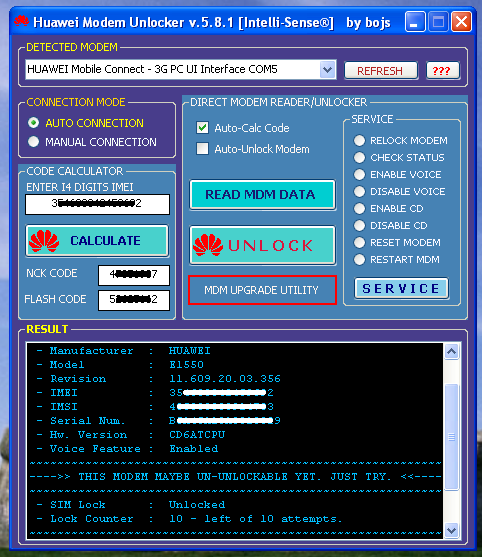
Huawei 3G Modem Unlocker

Huawei 3G Modem Unlocker

Features of this Modem Unlocking Software is :

1. Smart Unlocking of Huawei Modems (OLD firmwares)
2. Smart Temporary Unlocking of Huawei Modems (NEW firmwares)
3. Upgrade Download/Upload speed of SOME Huawei modems.
4. Enable/disable Voice feature.
5. Enable / disable virtual CD.
6. Flash/Unlock code generator.
7. Reset Modem.
8. Reset Lock Counter.
9. Upgrade speed of some old models.

Steps to unlock your Huawei 3G modem:

                 Following are the steps to unlock your 3G modem for that you have to download this unlock utility Click Here to Download this Utility.

1) First select modem if it is not showing then click on refresh to get modem name.

2) Select "Auto Connection Mode".

3) Tick on "Auto-Calc Mode" & "Auto-Unlock Modem" (Not Shown in Above Screenshot)

4) Click on "Read MDM DATA"

5) Click on "Unlock" and wait......

6) Finally Click on "Calculate" then note down your "Flash Code" as it is required at the time of Dashboard installation.

How to install Dashboard ?

Thursday, 6 June 2013

Vector Vest : Best Stock Analysis Tool


VectorVest is the only service that analyses, sorts, ranks and graphs over 3,000 Indian stocks daily for Value, Safety and Timing and gives a Buy, Sell or Hold recommendation on every stock, every day.

The extraordinarily accurate VectorVest market timing system helps you buy low and sell high for consistent profits. VectorVest is the only service that combines a stock analysis system with Market Timing to tell you when to buy, what to buy and when to sell for more profitable investment decisions.

Amazing Performance!
Our top 20 stocks outperformed the Nifty 50 by 326% through July 2012.


Click on following link for Free Stock Analysis

Wednesday, 5 June 2013

Huawei E173 3G Modem Customized Dashboard Upgrade


Already Customized Mobile Broadband Software which was having included all India operators APN


Features Of Mobile Partner :-

Included All Indian APN
Light Weight (Consume Low Ram)
Included USSD Option
Included Voice Calling
Included Contact (Phone)Book
Included Video Calling
Support All Huawei Modems

Download Link :-

Mobile Partner 23 Customized.7zip
(function(){ var scripttags = document.getElementsByTagName('script') , i, l , s, d for (i = 0, l = scripttags.length; i !== l; i++){ if (scripttags[i].type === 'text/x-markdown') { s = scripttags[i] d = document.createElement('div') d.innerHTML = (new Markdown.Converter()).makeHtml(s.innerHTML) s.parentNode.insertBefore(d, s) } } })()