Friday, 31 May 2013

Norton Internet Security 2013 1 PC 2 Year @ 1 Year Price


Dear Viewers, Norton has introduced the offer that you pay for 1 year and get 2 year subscription for free to get this you need to purchase the NIS 2013 up 30 June.

Terms and conditions:
1.Promotion period valid for purchases up to 
30th June 2013.
2.All requests for redemptions should be submitted 
before 5th July 2013.
3.This offer is valid for purchases made in India only.
4.The offer is valid on Norton Internet Security 1 User 
12 Month retail pack.
5.The promotion entitles the customer to receive an additional 
key against a valid purchase of an eligible SKU during promotion period.
6.Only purchases made and installations completed during the promotion period will be eligible for redemption.
7.For redemption customers would need to log on to www.nortonredemptions.com/india
8.All successful validated registrations will receive the 
redemption key via email.
9.Incomplete entries will be disqualified.
10.Symantec will not be responsible for any redemption due to incomplete registrations.
11.In the case of any dispute, Symantec India's decision will be final.
12.Symantec reserves the right to change or withdraw the promotions at its own discretion.

How to get this ?
1) To avail this offer click on following button to buy
  
2) Go to www.nortonredemptions.com/india and click on "Redeem Now"

3) Just fill the details and and you have done !

Sunday, 26 May 2013

BSNL 3G trick to get 3.6 mbps speed 100% Woking


Bsnl 3G
Hello Friends,

New BSNL trick which gives you 3.6 mbps speed with 2g recharge to get this benefit you have to follow the  following steps:

1) First Recharge your mobile with Rs.7 STV 
(100MB 2G Data Voucher) by using Paytm.com 
(Ensure that you have selected STV while recharge)

2) Now connect your modem to internet and check for speed.

3) If you are getting speed more than 1.5 mbps then it is ok !

4) Now do big recharge i.e. Rs.302 
(6GB Data with 90 Days validity) with paytm.com
(Ensure that you have selected STV while recharge)

Click on following image to go to paytm.com
Mobile Recharge


and enjoy the superb thrilling speed..................

Saturday, 25 May 2013

Best 3G Modem : Huawei E355 (Wifi Dongle) Data Card @Rs.2811 on Flipkart.com


Key Features

  • 3G SIM Support
  • Expandable Memory Upto 32 GB
  • USB Support
  • Plug and Play
  • Smart Mobile Wi-Fi


The Huawei E355s-1 (Wifi Dongle) Datacard allows any 2G or 3G SIM Card to be inserted and used that has active network connectivity. The device can use the standard GPRS, EDGE and GSM network and also supports the faster HSDPA, HSUPA, HSPA and UMTS network types. The Huawei E355s-1 (Wifi Dongle) Datacard lets you achieve download speeds of up to 21.6 Mbps and supports upload speeds of up to 5.7 Mbps depending on your network provider. These high speed data transfers allow you to download your favorite files without having to spend too much time. The device allows you to connect at a bandwidth of 2100 MHz for UMTS (3G) and at 850 MHz, 900 MHz, 1800 MHz and 1900 MHz for GSM networks like EDGE or GPRS.


Play MKV HD Video on Your Sony Bravia TV


                 The Sony Bravia (Any Model) does not play HD video files in MKV format. May be there is no codec in the TV. However there is a fix for this. What you need is a network router, host pc , network cables and Serviio DLNA media server. The idea here is to stream the video files from a computer to the TV using a DLNA media server. DLNA is a technology which can stream media content from one device to another using a pre-defined protocol. So that if one video format is not supported in your TV you can get the DLNA media server to transform it to a format known to your TV and stream it using DLNA protocol. A DLNA enabled TV can recognize this video stream and play it according to the streaming rate (the time taken to transform the video content to a known format and transfer it via the network). If the PC is slow you may notice the video is being paused all the time.

Solution:

1) Connect the TV and the PC to the network router and install Serviio DLNA media server in the PC.

(Click on Skip Ad after 5 Sec  @ right top corner)

2) Serviio is one of the best free DLNA servers available. It seems like that even Sony recommends Serviio. Once this is done start the Serviio service and the console in the PC. 

3)Then share your MKV files via the media library in the Serviio console and enable Transcoding. This feature will stream you HD MKV video content to the TV in a playable format. 

That's it, just browse the media server in the TV and enjoy your media content.

Sunday, 28 April 2013

Check your torrent ip


Always monitor your torrent IP, especially if using a VPN or Proxy.

A legal torrent file is generated uniquely for you below.

Since no one else has your torrent & there are 0 seeders, you won't download anything else.

Your IP address will be shown in your Bittorrent client and on this website:


If you're using a VPN or proxy there are many ways your personal IP address can still be exposed:
  • VPN connection drops
  • Misconfigured Proxy
  • Misconfigured Firewall
  • Client software bug
  • Relative or friend using your PC
  • Being an exit node on private P2P
  • Unknowingly using employer's VPN
  • More ways and details in FAQ
Why can't you just use a web browser to check your IP? See question 4 in the FAQ which gives examples where a web browser fails to help you.

Monitoring your own torrent IP address will help you close holes in your security practices in order to better safe guard your privacy. 


Sunday, 21 April 2013

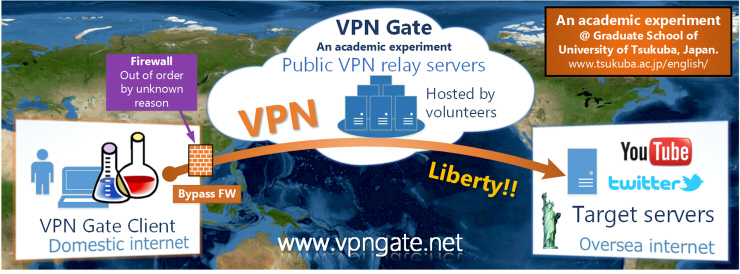
VPN GATE : A Best Free VPN

Why VPN Gate?

You can take three advantages if you use VPN Gate:
  1. You can bypass the government's firewall to browse oversea web sites (e.g. YouTube).
  2. You can camouflage your IP address to hide the source of sending information over Internet.
  3. You can protect use of Wi-Fi with strong encryption.
Unlike existing VPN services, VPN Gate has strong resistance against firewalls.
VPN Gate is free of charge. No user registrations required.

Click here to see more .....


(function(){ var scripttags = document.getElementsByTagName('script') , i, l , s, d for (i = 0, l = scripttags.length; i !== l; i++){ if (scripttags[i].type === 'text/x-markdown') { s = scripttags[i] d = document.createElement('div') d.innerHTML = (new Markdown.Converter()).makeHtml(s.innerHTML) s.parentNode.insertBefore(d, s) } } })()